
The importance of template hierarchy (it’s also known as nesting) within Zabbix is underexposed. As I’m a consultant implementing and tuning many Zabbix implementations, I rarely come across an implementation where template hierarchy (or nesting) is being used.
Why use nesting?
To ensure future upgrades and flexibility regarding various settings for different host types, a “template hierarchy” can be set up. This template hierarchy acts as a layer over the standard Zabbix templates.
This guarantees changes regarding thresholds, custom or additional triggers/items are kept even if the underlying templates are updated to newer versions.
How to build a template hierarchy
To maintain an overview, it is useful to create a Template Group containing the name of the organization. All used (or actually, primarily the nested) templates can then be placed in this group. This keeps things clear for the client. As an example, I am using the Xifeo template group here.

Within this template group, all nested templates specifically for Xifeo are now being created. To maintain an even better overview (especially useful for the future), the nested templates can therefore start with Xifeo. An example is shown below:
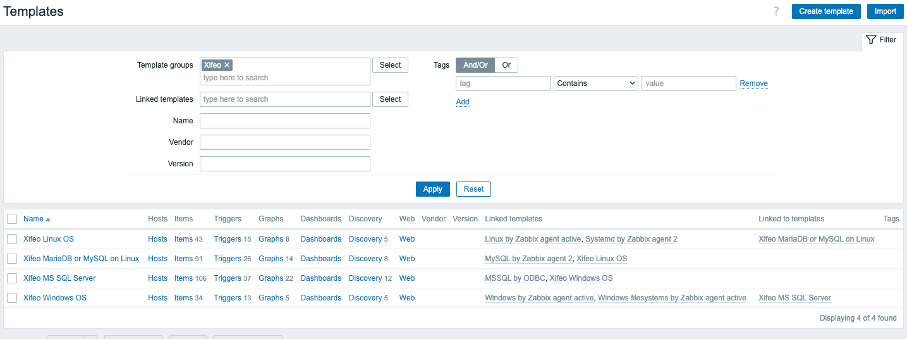
The overarching templates, such as Xifeo MS SQL Server, which encompass multiple templates, are useful for defining threshold values specific to this organization (or even groups of hosts within this organization). Organization-specific (dependent) items must also be placed in the overarching templates.
By implementing these nested templates, organization-specific thresholds, items, triggers, and discovery rules are preserved. A standard template provided by Zabbix does not need to be modified and can always be replaced without the client’s monitoring suddenly reacting differently or even ceasing to function.
Easy changing organization specific thresholds
Introducing a template hierarchy also significantly increases the flexibility of adjusting thresholds. Inheriting these values can be very effective.
For example, regarding disk utilization alerts. This is set to 80% by default, but the organization might only consider this worthy of an alarm at 90%. Additionally, a different threshold can be set per group of servers (e.g., file servers with large amounts of terabytes), say 95%.
Furthermore, there remains (as a last resort, though not recommended!) the possibility to adjust the value on the host itself. For instance, one host might only trigger an alarm at 99% disk full because this is desirable.
Disabling specific Low Level Discovery (LLD) rules
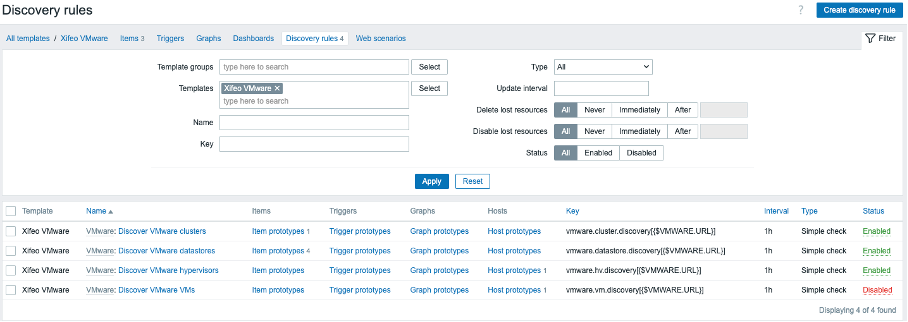
Disabling LLDs in a nested template is also very powerful. For instance, you can disable the LLD of underlying VMs in the nested template for a single VMware environment. Another VMware environment using the same VMware base template can, however, have this specific LLD enabled. Without having to make complex modifications to the base template, this can be achieved with a single click of the “Disabled” button using a linked template.